✓ Free Standard U.S. Shipping (1–5 Business Days)·✓ 30-Day Returns ($0 Restocking Fee)·✓ 1-Year Retailer Warranty

What Is SuperBox? S8 Hardware, Setup & Monthly Fee Facts

If you are asking what is SuperBox, it is a dedicated Android 12.0 streaming media player that connects to any television, monitor, or projector via HDMI output and streams over your home internet. Unlike a ~$40 Wi-Fi dongle, the current 2026 SuperBox S8 lineup ($359–$449) pairs 4GB DDR memory, 32GB–128GB eMMC storage, and 1000Mbps Ethernet. It carries a $0/month hardware fee from Suprbox, while your home ISP and any paid streaming apps remain separate.
How SuperBox Works on Your TV
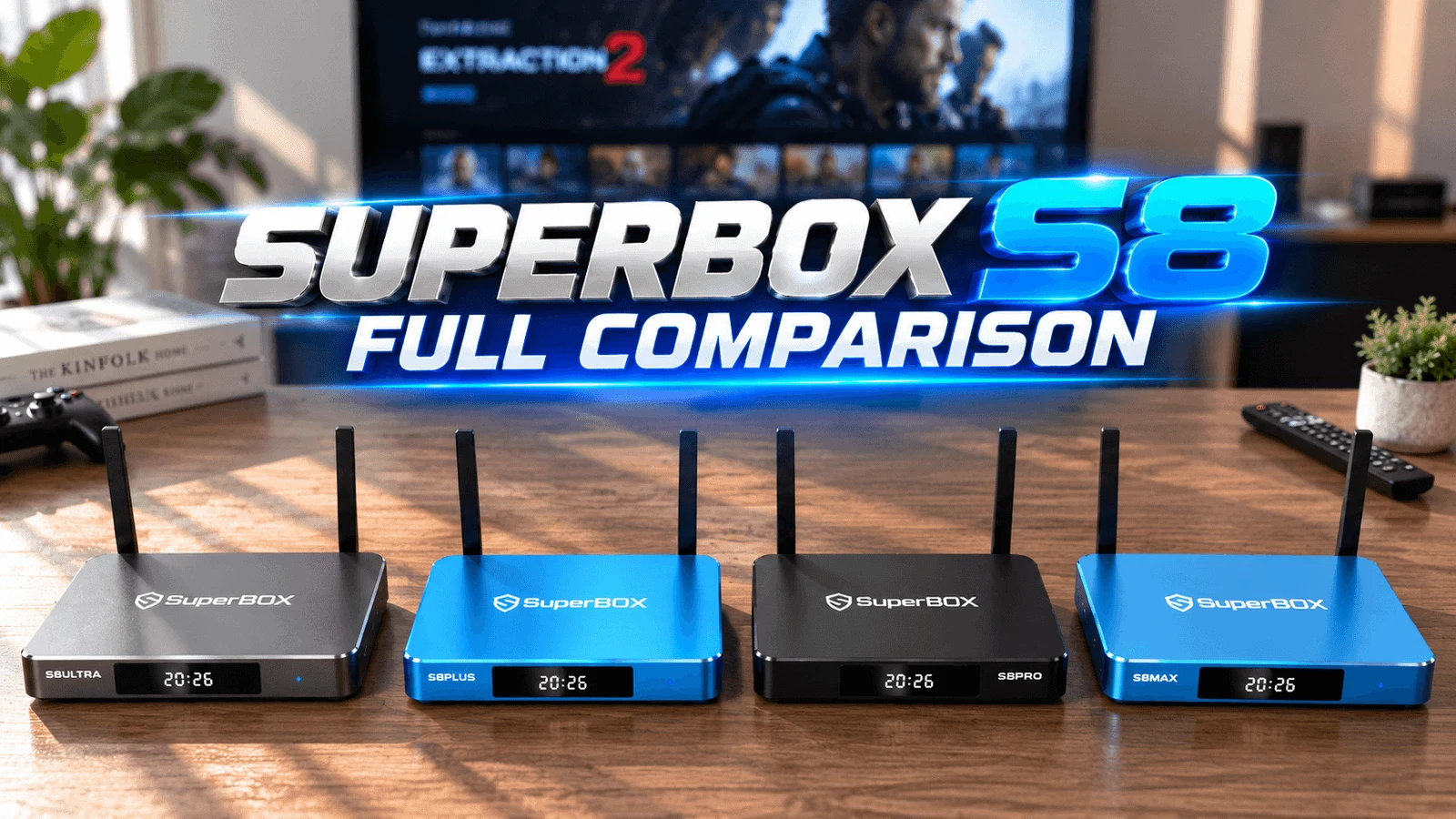
A SuperBox works like a compact, dedicated Android 12.0 computer built specifically for living-room screens. Instead of relying on an aging smart TV’s slow built-in chip, you connect the S8 media player to an available HDMI port on your television (or use the rear 3.5mm AV jack on legacy non-HDMI sets), power it from a wall outlet with the included DC 5V/2A adapter, and join your home router over dual-band Wi-Fi 6 or a wired 1000Mbps Ethernet cable.
Every factory-sealed unit across the current 2026 SuperBox S8 series runs on the same core silicon: a Quad-core ARM Cortex-A53 processor, Mali-G31 MP2 graphics, 4GB DDR memory, Bluetooth 5.2, and an H.265 video decoder rated up to 6K at 60fps (actual screen resolution depends on your television, HDMI cable, app, and connection speed). Inside the retail box, you receive 1 media player with 2 external antennas, 1 HDMI cable, 1 DC 5V/2A power adapter, 1 user guide, and 1 Bluetooth voice remote (backlit version on S8 Ultra; standard non-backlit RC-200 on S8 Max, Plus, and Pro)—note that 2 fresh AAA batteries for the remote are required and not included unless stated on the box.
Suprbox operates as an independent U.S. online retail store carrying only the 4 current SuperBox S8 models (S8 Pro at $359, S8 Plus at $379, S8 Max at $399, and S8 Ultra at $449) plus the replacement RC-200 voice remote ($39.90). Older S6 and S7 boxes are not sold at Suprbox.
SuperBox S8 vs. a $40 Streaming Stick
First-time shoppers frequently ask why a dedicated streaming box costs $359–$449 compared to an entry-level $40 streaming stick. The gap comes down to physical desktop-style hardware versus a minimalist dongle built strictly to hide behind a wall-mounted screen.
| Hardware Dimension | SuperBox S8 Series ($359–$449) | Typical ~$40 Streaming Stick | Practical Home Impact |
|---|---|---|---|
| Form Factor & Antennas | Standalone tabletop media box with 2 external adjustable antennas | Compact dongle hanging off an HDMI port | External antennas and larger housing give better Wi-Fi reach and cooler airflow |
| Operating System | Open Android 12.0 platform | Locked vendor-curated TV interface | Standard Android 12.0 navigation with broader peripheral and display controls |
| Memory & Storage | 4GB DDR memory; 32GB–128GB internal eMMC | Entry-level stick memory and minimal storage | Holds larger app libraries and updates without constant storage warnings |
| Network Hardware | Dual-band Wi-Fi 6 (2.4GHz / 5GHz) + built-in 1000Mbps Ethernet LAN | Wi-Fi only (wired Ethernet needs an extra adapter) | Direct Cat5e/Cat6 LAN cable eliminates wireless interference on 4K streams |
| Rear & Side Ports | Rear HDMI output, DC 5V/2A, IR, 3.5mm AV, 1000Mbps LAN, SPDIF + side TF & USB expansion | Single HDMI plug + micro/USB-C power only | Supports older non-HDMI TVs, external optical receivers, flash drives, and TF cards |
| Video Decoder | H.265 up to 6K@60fps decoder capability | Standard HD or basic 4K stick decoding | Smooth H.265 playback up to 4K@60Hz (dependent on display, cable, app, and speed) |
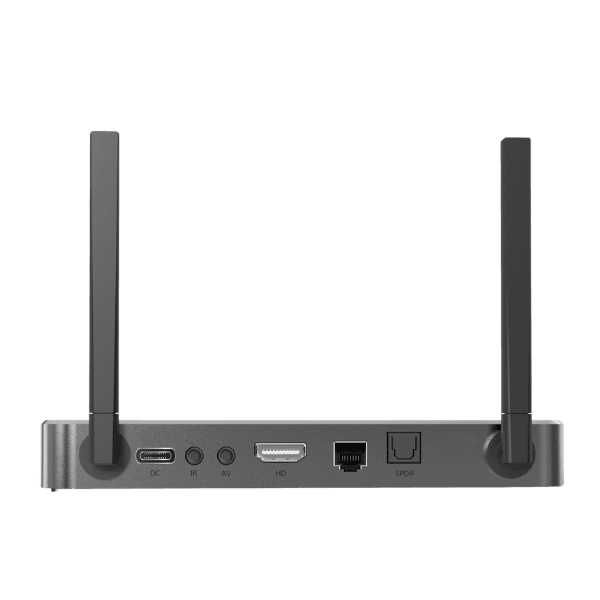
Looking at the rear panel above, the dedicated hardware difference is immediately visible: from the DC 5V/2A power input and IR extender jack to the 3.5mm AV output, HDMI output, 1000Mbps Ethernet LAN, and SPDIF optical audio port, plus side TF card and USB expansion (USB 3.0 and USB 2.0 or USB-C depending on the S8 model). If you already know you want a full S8 box and need help picking between Pro (32GB), Plus (64GB), Max (64GB), and Ultra (128GB), read our which SuperBox to buy guide for a model-by-model breakdown.
Monthly Fees & Three-Part Cost Ownership
Does SuperBox need a subscription, or is there a monthly fee for SuperBox? The honest answer requires separating hardware ownership from internet service and third-party content apps—something social media clips often blur together.
| Cost Layer | Who You Pay | Exact Pricing & Terms | What Is Included vs. Excluded |
|---|---|---|---|
| 1. One-Time S8 Hardware | Suprbox (shopsuprbox.com) | $359–$449 one-time; $0/month hardware fee | New, factory-sealed S8 unit, Bluetooth voice remote (2 AAA batteries excluded), HDMI cable, DC 5V/2A adapter, Free ($0) U.S. standard shipping, 30-day $0-restocking returns (RMA required), and 1-year seller hardware warranty |
| 2. Home Broadband Service | Your local internet provider (ISP) | Billed separately by your ISP | Required for streaming via Wi-Fi 6 or 1000Mbps Ethernet; the SuperBox S8 is a playback box, not a modem or wireless carrier |
| 3. Streaming Apps & Services | Third-party app providers | Free ad-supported apps or paid plans billed by each provider | Paid platforms (such as Netflix, YouTube TV, Disney+, or Prime Video) require your own accounts; Suprbox makes no bundled TV subscription promises and includes zero paid memberships |
Simply put, Suprbox sells pure streaming hardware for individual U.S. households, shipping anywhere within the United States. You never pay Suprbox a recurring hardware fee, and Suprbox makes no bundled TV subscription promises and includes zero paid TV or streaming memberships.
Internet Speed, Ports & Setup Basics
Because the SuperBox S8 connects like any home media player, matching your internet plan and cables takes less than five minutes. Use these verified baselines before plugging in your box:
- Recommended internet speed: Plan at least 10–25 Mbps (10 Mbps minimum) for steady 1080p HD streams, 25–50 Mbps (25 Mbps or higher) for smooth 4K playback, and 50 Mbps or above when several phones, consoles, or laptops share your household router.
- Wi-Fi 6 vs. wired LAN: Plug a network cable into the rear 1000Mbps Ethernet port whenever your router sits near the TV stand. If you use dual-band Wi-Fi 6, pick the 5GHz band within roughly 15–25 feet in the same room for peak speed, or switch to 2.4GHz when the signal passes through walls.
- Wall power and display limits: Always plug the included DC 5V/2A adapter into a wall outlet or surge strip rather than a television USB port. Direct HDMI output delivers up to 4K at 60Hz on modern sets (or 1080p / 720p on older HD TVs), while older non-HDMI TVs wired through the rear 3.5mm AV port top out at 480i or 480p.
When your box arrives, follow our step-by-step SuperBox setup guide for TV, monitor, and projector wiring, Bluetooth 5.2 RC-200 remote pairing, and initial Android 12.0 screen scaling.
Common SuperBox Questions Answered
What is a smart TV box?
A smart TV box is a standalone streaming computer that plugs into a television’s HDMI port (or analog AV port on older TVs) to run streaming apps over your home Wi-Fi or Ethernet connection. Rather than replacing an older non-smart TV or a sluggish smart TV interface, a box like the SuperBox S8 handles app processing with dedicated 4GB DDR memory and 32GB–128GB eMMC storage while your TV acts purely as the display.
What internet speed is needed for SuperBox?
Plan 10–25 Mbps for 1080p HD streaming and 25–50 Mbps at the box location for consistent 4K playback, stepping up to a 50 Mbps household plan if multiple family members stream at once. Using the built-in 1000Mbps Ethernet port or staying within 15–25 feet of a 5GHz Wi-Fi 6 router helps maintain stable throughput.
What is the difference between Firestick and SuperBox?
A ~$40 streaming stick prioritizes pocket-sized portability over ports and local capacity, usually relying solely on Wi-Fi and compact dongle power. By contrast, a SuperBox S8 is a desktop-style Android 12.0 box with dual external antennas, 4GB DDR memory, 32GB–128GB eMMC storage, built-in 1000Mbps Ethernet, rear HDMI output, AV, SPDIF optical, IR, and side TF card and USB expansion.
Does SuperBox include channels or require a monthly fee?
SuperBox S8 devices have $0/month in hardware fees from Suprbox, and Suprbox makes no bundled TV subscription promises and does not include paid streaming memberships. Like any Android streaming player, your home broadband plan and any paid third-party apps you choose to log into remain separate.
Which SuperBox should I check next?
Review our SuperBox Support Center for shipping, 30-day $0-restocking returns, and 1-year seller warranty rules, or compare all four current models side by side in which SuperBox to buy.