✓ Free Standard U.S. Shipping (1–5 Business Days)·✓ 30-Day Returns ($0 Restocking Fee)·✓ 1-Year Retailer Warranty

Can One SuperBox Run Two TVs? Multi-Room Setup Guide

No. If you are asking can one SuperBox run two TVs independently at the same time, the hardware answer is no. Every SuperBox S8 has only 1 HDMI output, so 1 box cannot stream two different shows on 2 televisions simultaneously. A powered 1-to-2 HDMI splitter only mirrors the identical screen to two nearby displays, while independent multi-room streaming requires 2 separate boxes.
Why 1 SuperBox S8 Cannot Stream 2 Different Shows
To understand how a SuperBox for two TVs works, start with the physical rear panel of the device. Every unit across the 2026 SuperBox S8 lineup—S8 Pro ($359), S8 Plus ($379), S8 Max ($399), and S8 Ultra ($449)—is a single-stream Android 12.0 media player built around 1 video pipeline and 1 HDMI output.
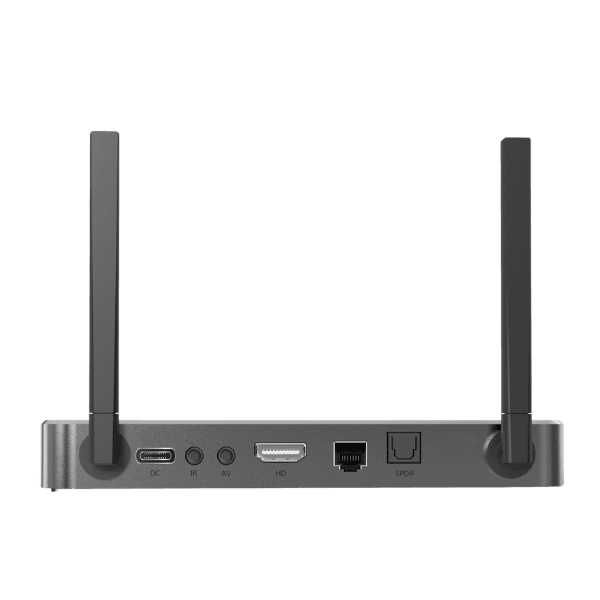
Looking at the rear panel above, there is only 1 HDMI output port (labeled HD next to the 1000Mbps Ethernet LAN jack and 3.5mm AV port). Because Android 12.0 renders 1 active screen buffer at a time, 1 SuperBox S8 cannot send a football game to your living room HDMI port while streaming a movie to a bedroom TV.
Some shoppers ask whether plugging 1 TV into the HDMI output and a second TV into the rear 3.5mm AV port allows two independent feeds. Even when an analog AV cable is attached alongside HDMI, both outputs come from the exact same Android 12.0 session—never two separate shows—and the 3.5mm AV jack is hardware-capped at standard-definition 480i or 480p, far below modern 4K at 60Hz or 1080p HDMI televisions.
3 Ways to Use SuperBox on 2 TVs Compared
When homeowners want to use SuperBox on multiple TVs, there are 3 practical configurations. Only 1 of them lets two people watch different programs at the same time.
| Setup Option | Hardware Needed & Total Cost | Can Both TVs Watch Different Shows? | Practical Tradeoffs & Best Fit |
|---|---|---|---|
| Option 1: Move 1 Box Between Rooms | 1 SuperBox S8 ($359–$449 total) + spare HDMI cable | No (only 1 TV operates at a time) | Lowest upfront cost; repeatedly unplugging the DC 5V/2A power cord and HDMI output risks port wear and requires switching rooms physically |
| Option 2: Powered 1-to-2 HDMI Splitter | 1 SuperBox S8 ($359–$449) + third-party powered 1-to-2 HDMI splitter (not sold by Suprbox) | No (mirrors the exact same screen on both TVs) | Works only for synchronized viewing in adjacent spaces; suffers remote cross-talk, wall range drops, and EDID resolution step-downs |
| Option 3: Two Independent S8 Boxes (Recommended) | 2 SuperBox S8 units: e.g., $758 (S8 Max + S8 Pro) or $808 (S8 Ultra + S8 Pro) | Yes (2 completely independent Android 12.0 streams) | Zero remote interference, separate Wi-Fi 6 or 1000Mbps LAN paths, Free U.S. shipping, 30-day $0-restock returns, and 1-year warranty |
Option 1: Moving 1 SuperBox S8 Between TVs ($359–$449)
If a spare room or patio TV is used only occasionally, leaving a spare HDMI cable plugged into the second television lets you carry 1 SuperBox S8 between rooms instead of buying a second unit. Keep in mind that you must still unplug the DC 5V/2A wall power adapter (never power the box from a TV USB port) and move the HDMI output cable each time, which increases physical wear on the rear connectors over months of daily swapping.
4 Real-World Limits of a 1-to-2 HDMI Splitter
A powered 1-to-2 HDMI splitter duplicates the electrical signal leaving your SuperBox S8 HDMI output and sends copies to 2 displays. That only makes sense if you want the exact same game or movie mirrored on two nearby TVs (such as an open-concept living room and patio). Before buying extra cables, note that Suprbox does not sell HDMI splitters, and weigh these 4 hardware limits:
- Identical mirrored screen only: Both televisions display the exact same Android 12.0 launcher, app window, and playback timestamp simultaneously. Neither viewer can open a different app or pause independently.
- Cross-room navigation conflicts: Because 1 Android 12.0 session drives both screens, pressing Home, Back, or a search button in one room immediately interrupts whoever is watching in the other room.
- Bluetooth 5.2 remote collision across walls and floors: Each SuperBox S8 includes 1 voice remote paired via Bluetooth 5.2 (with infrared for basic power/initial setup). Bluetooth signals drop unpredictably through drywall, tile, or floors—and if you use a second remote, both inputs fight over the same single-box cursor.
- EDID resolution step-down and long-cable handshake drops: A splitter negotiates EDID display capabilities across both connected screens. If your main living room TV supports 4K at 60Hz while your secondary bedroom TV is 1080p or 720p, the splitter typically steps both screens down to the lower-spec display, and long unpowered HDMI runs between rooms frequently trigger HDCP or CEC blank-screen glitches.
Best Independent Two-Room SuperBox S8 Combos
For families wanting a true multi room superbox setup where living room and bedroom viewers watch different programs at the same time, running 2 independent SuperBox S8 boxes is the only reliable solution. All 4 S8 trims run the identical Quad-core ARM Cortex-A53 CPU, Mali-G31 MP2 GPU, 4GB DDR memory, Android 12.0, dual-band Wi-Fi 6, 1000Mbps Ethernet, Bluetooth 5.2, and H.265 6K@60fps decoder (real screen resolution depends on your TV, cable, app, and internet speed).
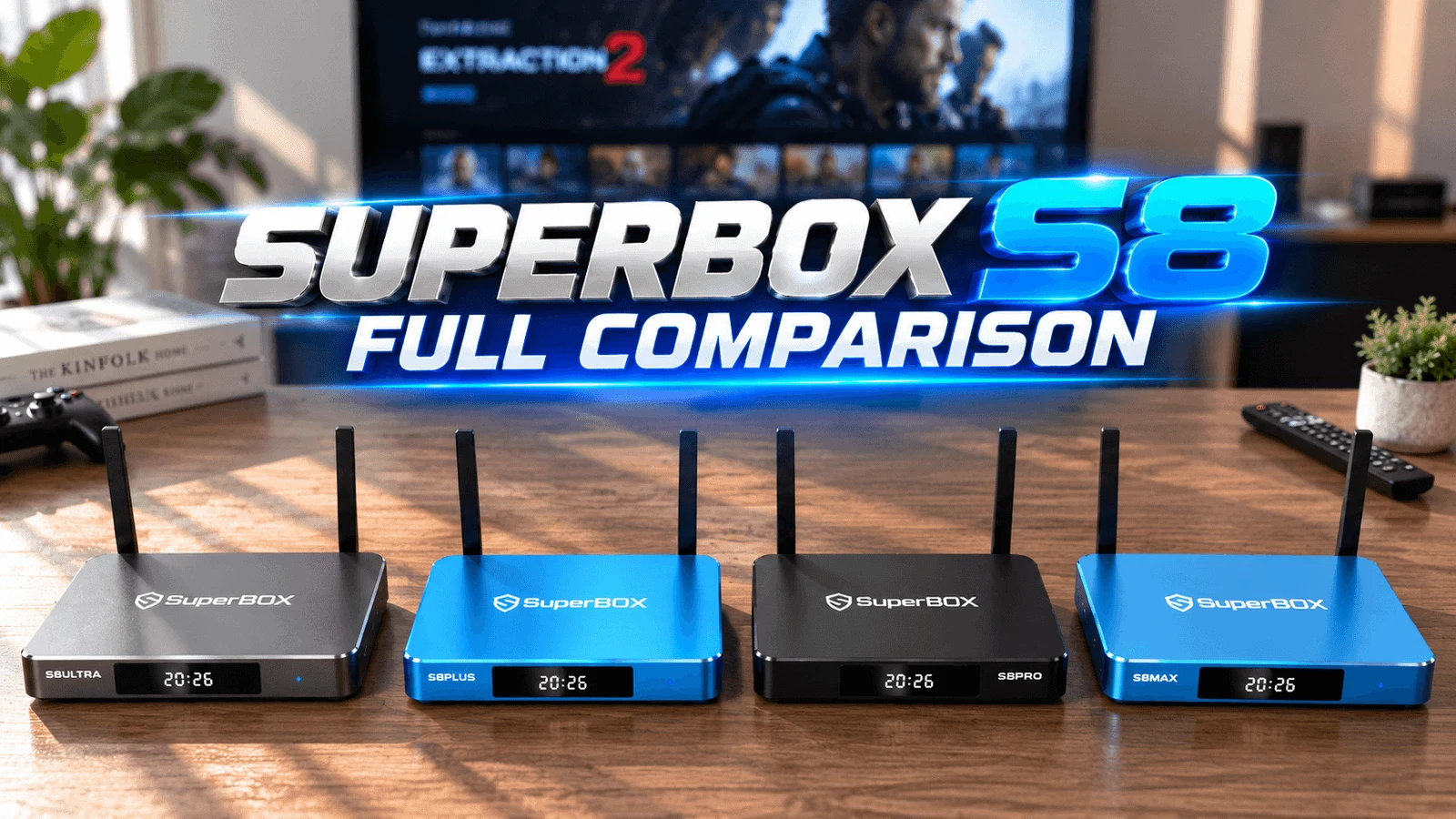
Because every S8 shares the same core processor and Wi-Fi 6 / gigabit LAN radio, you do not need two flagship Ultra units. Pair a higher-storage box on your primary living room TV with the $359 entry box in the bedroom or den:
| Two-Room Pairing | Room 1 (Main TV) | Room 2 (Bedroom / Den) | 2-Box Total (USD) | Who Should Pick This Combo |
|---|---|---|---|---|
| Best Overall Value | SuperBox S8 Max ($399 · 64GB eMMC · Full Multi-View) | SuperBox S8 Pro ($359 · 32GB eMMC) | $758 | Best balance for most U.S. households: 64GB + full multi-view in the living room, compact 32GB S8 Pro in the second room |
| Flagship + Bedroom | SuperBox S8 Ultra ($449 · 128GB eMMC · Backlit Remote) | SuperBox S8 Pro ($359 · 32GB eMMC) | $808 | Ideal if the main TV or master suite is watched in the dark (backlit voice remote) or needs 128GB local app capacity |
| Mid-Tier 64GB + Entry | SuperBox S8 Plus ($379 · 64GB eMMC · Limited Multi-View) | SuperBox S8 Pro ($359 · 32GB eMMC) | $738 | Saves $20 over Max + Pro if you want 64GB storage on the main TV without full multi-view |
| Lowest-Cost 2-Room S8 | SuperBox S8 Pro ($359 · 32GB eMMC) | SuperBox S8 Pro ($359 · 32GB eMMC) | $718 | Lowest two-box entry price while keeping 4GB DDR, Wi-Fi 6, and 1000Mbps Ethernet in both rooms |
Need help comparing all 4 trims in detail before picking your primary room unit? Read our which SuperBox to buy guide or check full specs across the SuperBox S8 series.
Network Speed, Remotes & Store Terms for 2 Boxes
- Separate Wi-Fi 6 / 1000Mbps LAN paths: Connect the living room box via 1000Mbps wired Ethernet or 5GHz Wi-Fi 6 (strongest within roughly 15–25 feet in the same room) and place the distant bedroom box on 2.4GHz Wi-Fi 6 if walls sit between the router and TV. Plan at least 10–25 Mbps per 1080p HD stream or 25–50 Mbps per 4K stream—so a 50 Mbps or faster home broadband plan keeps two boxes running smoothly alongside phones and laptops.
- Zero remote interference (AAA batteries excluded): Each box pairs privately over Bluetooth 5.2 to its own remote in the box (backlit voice remote on SuperBox S8 Ultra; standard non-backlit RC-200 on SuperBox S8 Max, Plus, and Pro). Remember to have 2 fresh AAA batteries ready for each remote, as batteries are not included unless stated on the box (replacement RC-200 remotes are also sold separately at $39.90).
- Transparent Suprbox retail & warranty terms: Every unit sold by Suprbox is new, factory-sealed hardware with a $0/month hardware fee (your home ISP and any paid third-party streaming apps remain separate; Suprbox makes no bundled subscription promises and does not sell S6 or S7 models). Orders ship to 1 country (United States) with Free U.S. standard shipping ($0), a 30-day return window with a $0 restocking fee (RMA required), and a 1-year seller hardware warranty with return shipping covered on approved warranty claims.
Once your boxes arrive, follow our SuperBox setup guide for wall-outlet DC 5V/2A power, HDMI input switching, and Bluetooth 5.2 remote pairing in each room.
Multi-Room, Split-Screen & Roku TV Questions
Can I do split screen on SuperBox instead of running 2 TVs?
Yes, supported apps on SuperBox S8 support on-screen Multi-View (listed as Yes on S8 Ultra and S8 Pro, Yes with full support on S8 Max, and Yes with limited support on S8 Plus), but that splits multiple video windows on 1 television screen through 1 HDMI output. Multi-view does not send separate independent shows to 2 different TVs in separate rooms.
How can one cable box run two TVs when one SuperBox cannot?
Older coaxial cable setups either split an unencrypted RF feed to built-in TV tuners or relied on separate multi-room client boxes wired over coax or home networking. By contrast, a SuperBox S8 is an Android 12.0 computer that outputs a single decoded digital video signal over 1 HDMI output, so splitting that cable only copies the exact same picture to two screens.
Can you use SuperBox on a Roku TV or another Smart TV?
Yes. Any Roku TV, smart TV, monitor, or projector with an open HDMI input works with a SuperBox S8. Plug the included HDMI cable from the S8 HDMI output into an unused HDMI port on the Roku TV, connect the DC 5V/2A adapter to a wall outlet, and switch the Roku TV input tile to that HDMI port—or check our SuperBox setup guide for step-by-step display scaling.
What is the best two-room SuperBox S8 setup to order?
For most U.S. households, combining 1 SuperBox S8 Max ($399) in the living room with 1 SuperBox S8 Pro ($359) in the bedroom gives you $758 total for two independent 4GB DDR, Wi-Fi 6 streaming boxes—or step the main room up by $50 to the SuperBox S8 Ultra ($449) for 128GB storage and a backlit voice remote ($808 total).